
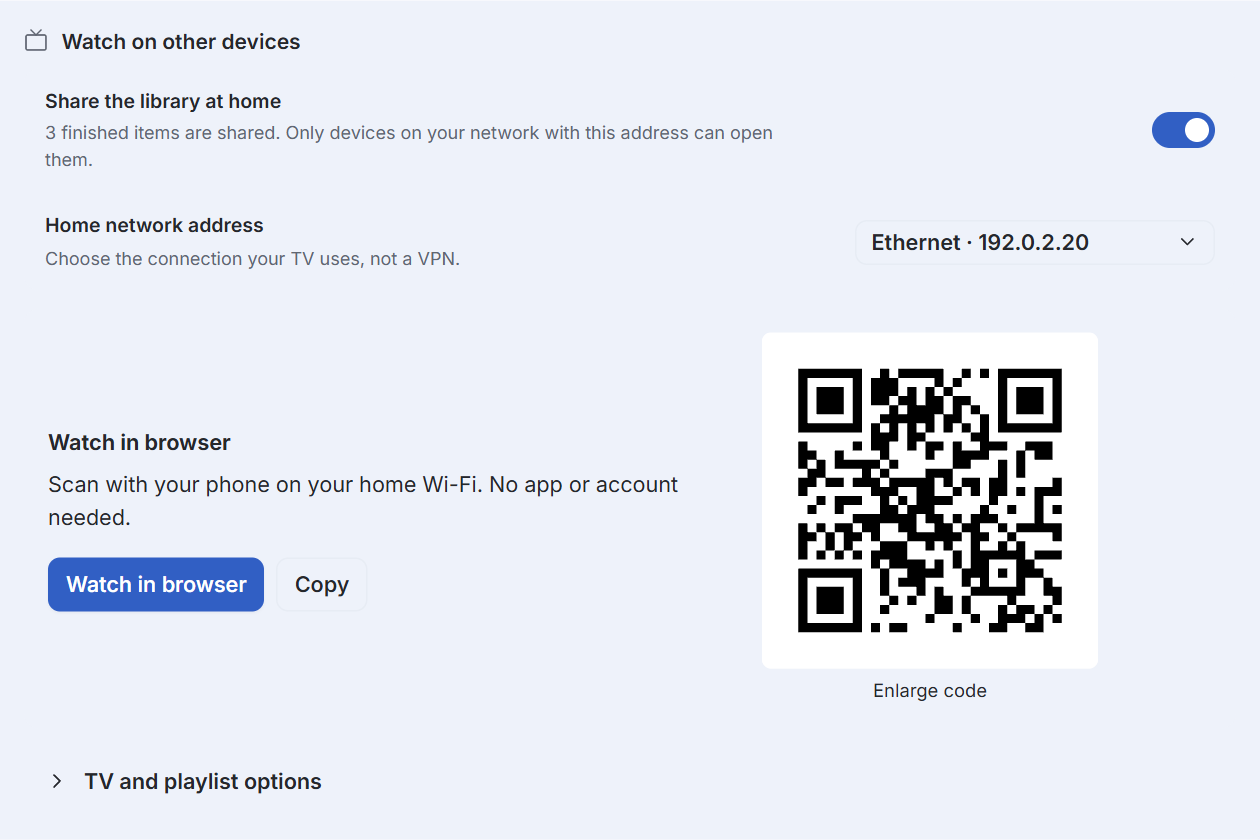
Turn on library sharing
In Loaderly, open Settings > Downloads. Under Watch on other devices, turn on Share the library at home. Leave Loaderly running on the computer.
Watch in browser
Scan the QR code in Loaderly with your phone camera on the same home Wi-Fi. The browser opens your library without an account or another app. On a TV browser use the full browser address instead.
Pick a video to play it.
Share just one video
For a single episode, choose the video in Files or on the home page for playback, then use the video link button. This link plays only that file, not the library. The M3U playlist is for the entire shared library.
Turning sharing off invalidates single-video links.
How do I watch on my TV?
Leave Loaderly open and connect the TV to the same home network. If several network addresses appear, choose the adapter connected to the TV’s network. Copy the full Playlist link (M3U).
In the TV player choose Add playlist, then M3U URL, paste the link and save. Select an episode to play it. In VLC on a computer choose Media, Open Network Stream, paste the same link and press Play.
A subscription and DLNA are not required.
If the phone shows a blank page
Use the complete browser link, not the playlist or the example from the screenshot. Keep the computer awake. Use the same home network, not mobile data or guest Wi-Fi. If the page works on the computer but the phone cannot connect, check whether the system firewall blocks incoming connections for this copy of Loaderly.
Do not disable the firewall or open a router port.
Stop sharing when you are done
Keep the full address private. DLNA does not require a password: devices on your home network can browse the shared files while it is enabled. To stop sharing, turn off Share the library at home in Downloads settings.
Hide or restore an episode on your phone
Under Your collection, tap Manage beside the episode, then Hide on this browser. To bring it back, open Hidden here, tap Manage, then Restore to collection. Only this browser changes; the original file stays on your computer.